
Current Edition: Elite_Hot-Key_Service CURRENT / PIPE V5
- IPC & Registry Persistence: Communicates between
App.cppandService.cppover named pipe\\.\pipe\EliteHotkeyServicePipeV5, storing entries underHKLM\SOFTWARE\EliteSoftware\Hotkeys\ServiceV5. - Native & Win-Key Overrides: Supports
overrideNativeflags, fullscreen app detection/blocking (blockFullscreen), and toggling entries individually. - Flexible Execution: Launch commands directly or via shell (
runAsCommand), with optionalrunAsSystemdelegation via the Windows Service. - Visual Config UI: Built with native Win32 Common Controls and persistent ListView column widths.
v1 / Legacy Edition: EliteHotkeyService v1 / LEGACY (v1.1.1.0)
- INI & SCM Architecture: Uses
C:\ProgramData\EliteSoftware\Hotkeys\config.ini,WH_KEYBOARD_LLhooking, andEliteHotkey_Servicein Session 0. - CLI & Deployment Wrappers: Includes
elite-hotkey.exe(/config,/daemon,/init),elite-hotkey-svc.exe,hotkeys.exe, andSetup-EliteHotkeyService.ps1. - Instant Auto-Save: Persists mappings immediately and triggers
Global\EliteHotkey_Reload_Event. - Preserved Release: Full compiled binaries & installer scripts archived in
v1.1.1.0.
Configuration Interface Screenshots CURRENT + v1 LEGACY
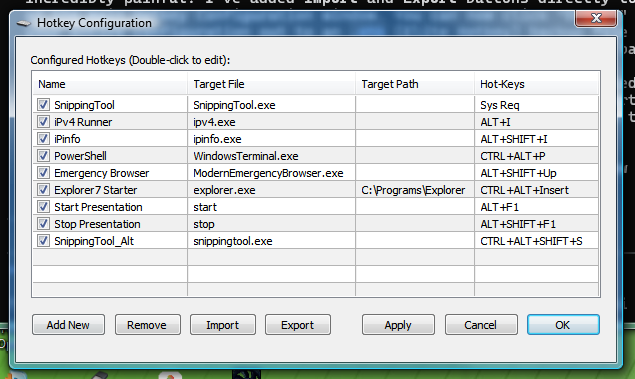
Current Edition (
Elite_Hot-Key_Service): Main Configuration GUI (Named-Pipe & Registry ServiceV5).
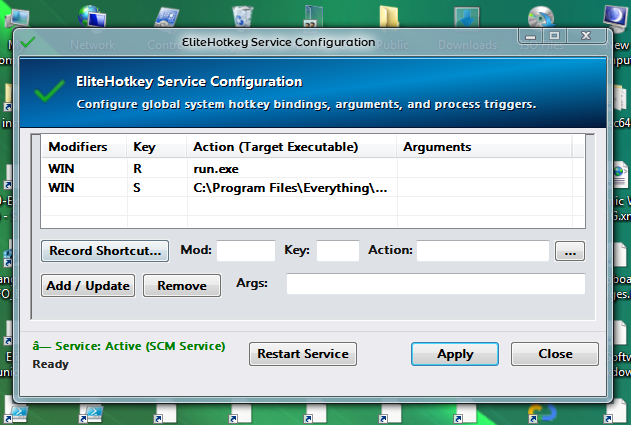
v1 / Legacy Edition (
EliteHotkeyService v1.1.1.0): Vista-styled Win32 Configuration Dialog.
v1 / Legacy Edition Release Components (v1.1.1.0)
| File | Role | Usage |
|---|---|---|
elite-hotkey.exe | Main Engine, Daemon & Config GUI | /daemon (or no args) for hook; /config for GUI; /init or /uninstall for setup. |
elite-hotkey-svc.exe | Native Windows SCM Service | Runs in Session 0 under SYSTEM (-install, -start, -uninstall). |
hotkeys.exe & hotkeys.cmd | CLI Wrappers | Type hotkeys for Config UI or hotkeys -start / -stop / -restart. |
Scripts/Setup-EliteHotkeyService.ps1 | Master Installer Script | Deploys binaries to System32, sets ACLs on config.ini, and registers service + tasks. |